How to Integrate AI Into Your Existing Software Without Rebuilding It
Your SaaS platform is humming along, handling millions of requests. Your CEO wants AI features by Q3. You have two choices: rip and replace, or integrate thoughtfully. We’ve seen this decision point countless times, and the smartest engineering leaders choose option two. Here’s how to do it: use APIs, microservices, and staged rollouts to add AI capabilities while protecting production stability.
Key TakeawayThe best AI integrations don’t require rewrites. They leverage managed APIs, event-driven architecture, and phased deployments to add intelligence without destabilizing existing systems.
In This Article
- Why AI Integration Matters Now (And Why Engineers Get It Wrong)
- The Core Challenge: Why “Just Add AI” Isn’t Simple
- The Four Pillars of Low-Risk AI Integration
- Integration Patterns That Work (And When to Use Each)
- Real-World Use Cases by Industry
- Step-by-Step Integration Process
- Common Pitfalls and How to Avoid Them
- Frequently Asked Questions
Why AI Integration Matters Now (And Why Engineers Get It Wrong)
The pressure to adopt AI is real. According to Gartner’s 2024 AI adoption survey, 55% of organizations have already deployed generative AI. But here’s what most executives don’t realize: integration complexity, not technology, remains the top barrier to scaled AI adoption. Many teams attempt to integrate AI by committing to massive refactoring projects. The result? Budget overruns, delayed time-to-value, team burnout, and projects that never ship.
“60% of enterprises cite integration complexity and legacy system constraints, not AI technology itself, as the primary barrier to scaling AI adoption across their business.”
McKinsey AI State of Play Report, 2024
Here’s the fundamental mistake: treating AI integration like a rearchitecture project. It doesn’t have to be. Organizations that adopt phased, API-first strategies see results faster and with significantly lower risk. Rather than rebuild, they wrap. Rather than rewrite, they extend.
The Core Challenge: Why “Just Add AI” Isn’t Simple
Before you can integrate AI into existing software effectively, you need to understand why it’s harder than the SaaS vendor’s marketing promises suggest. Legacy and production systems come with constraints that greenfield AI projects never face.
- Monolithic architecture constraints: Systems built as single deployable units make it hard to isolate AI logic from core business logic. Changes to one component risk the entire system.
- Data isolation and pipeline fragmentation: Customer data, transactional data, and operational data often live in separate databases. AI models need clean, consistent data, but extracting it across silos takes work.
- API version management and backward compatibility: Your current API clients expect stability. Adding AI features without breaking existing integrations requires careful versioning and rollout strategies.
- Latency and cost implications: Cloud-hosted AI APIs add network round-trip latency. At scale, that latency compounds. Per-call pricing models can also surprise teams with runaway costs.
- Security, compliance, and data residency: Regulated industries like finance and healthcare can’t simply send sensitive data to third-party AI services. You need encrypted pipelines, audit trails, and geographic data residency guarantees.
- Team skill gaps and knowledge transfer friction: Your existing team knows your codebase. Adding unfamiliar AI systems and frameworks introduces friction, slows deployment, and creates knowledge silos.
Get any one of these wrong, and your AI integration either fails silently, costs far more than expected, or breaks production. The organizations that succeed don’t ignore these constraints. They design around them from day one.
The Four Pillars of Low-Risk AI Integration
To integrate AI into existing software without catastrophic risk, anchor your approach around four pillars. These aren’t optional. They’re the foundation of every successful integration we’ve seen.
Pillar 1: API-First Architecture
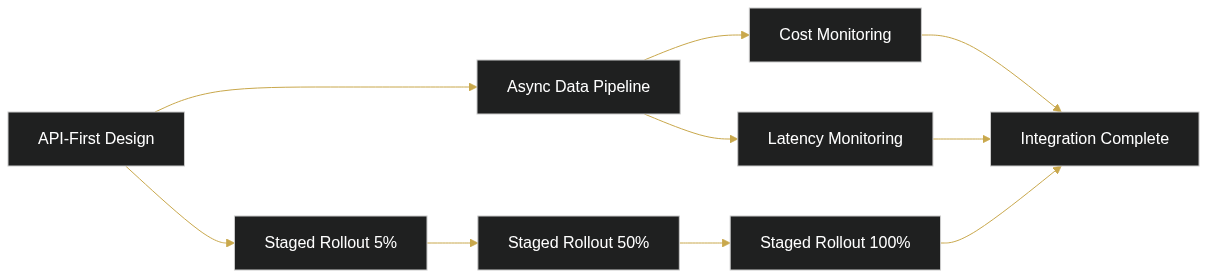
Rather than embed AI logic directly into your monolith, call it over an API. This decouples your core system from AI complexity. You can use managed services like OpenAI, Anthropic Claude, or Google Vertex AI to start. No model hosting. No infrastructure. If you need custom models later, you deploy them independently and swap the API endpoint. The advantage is enormous: you ship AI features in parallel with your core product without blocking other work.
Pillar 2: Staged Rollout Strategy
Feature flags, canary deployments, and A/B testing aren’t nice-to-haves. They’re non-negotiable for AI integration. Start with 5% of users. Monitor error rates, latency, and cost. Expand to 50%. Then full rollout. This approach catches problems at scale without blowing up your entire user base.
Pillar 3: Data Flow Optimization
Batch processing, async queues, and event-driven patterns prevent bottlenecks. If your AI API can’t keep up with real-time requests, buffer them in a queue, using Kafka, RabbitMQ, or SQS. Process them asynchronously. This also gives you visibility into what’s flowing through your AI systems, critical for cost management and debugging.
Pillar 4: Observability and Cost Governance
Implement logging, tracing, and budget controls before you deploy a single AI API call to production. Track latency (how long each AI request takes), accuracy (does the AI output match expected behavior), and cost (how much are you spending per feature per user). Set budget caps and cost anomaly alerts. Without observability, you’ll ship AI that works fine for a week, then mysteriously costs 10x what you expected.
Expert PerspectiveThe most successful integrations we’ve worked on started with a single, high-impact use case: customer support automation, content generation, or anomaly detection. Then expanded based on learnings. Trying to integrate AI across five features simultaneously creates too many failure modes. Pick one. Ship it. Measure it. Iterate.
Integration Patterns That Work (And When to Use Each)
Different systems and constraints call for different integration patterns. Choose based on your architecture maturity, team expertise, and timeline. Here’s how to evaluate each approach.
Pattern 1: Wrapper API Model
Best for: Minimal code changes, rapid deployment, proof-of-concept speed. How it works: You create a thin API layer that sits between your application and an external AI service. Your app doesn’t change much. It just calls a new endpoint instead of doing work internally. Trade-off: Limited deep optimization, potential network latency, and reliance on external service uptime. Example: Adding ChatGPT-powered search to a legacy knowledge base system. Your search endpoint now calls OpenAI’s API first, then returns results to the user.
Pattern 2: Microservices Decomposition
Best for: Teams ready to modernize gradually and want long-term flexibility. How it works: You extract high-value functions from your monolith into separate, independently deployable services. These services integrate via message queues or event streams. Your core system shrinks. AI logic lives in separate containers. Trade-off: More upfront architectural work, but enables future flexibility and parallel team development. Example: Breaking out recommendation logic, fraud detection, and dynamic pricing into their own microservices that communicate via Kafka.
Pattern 3: Sidecar/Adapter Pattern
Best for: Monolithic systems with clear architectural boundaries. How it works: Deploy AI logic alongside existing services, completely decoupled via well-defined interfaces. Your monolith doesn’t know about the sidecar. It just sends data to a known endpoint. The sidecar enriches or transforms that data and returns results. Trade-off: Requires thoughtful interface design upfront, but avoids major code rewrites. Example: A payment processing monolith calls an external fraud-detection sidecar. If the sidecar fails, the payment still processes with fallback logic.
Pattern 4: Headless AI Model
Best for: UI-heavy systems and content platforms where AI logic is independent from presentation. How it works: Host your AI backend independently, completely separate from your frontend or core application. Call it via REST or GraphQL. This gives maximum decoupling and team autonomy. Trade-off: Network latency between frontend and AI service, more infrastructure to manage, but cleanest separation of concerns. Example: An e-commerce platform with a React frontend that calls an AI content-generation service for product descriptions. The AI service has zero knowledge of your frontend tech stack.
Real-World Use Cases by Industry
SaaS and E-Commerce Platforms
Adding AI-powered product recommendations or dynamic pricing without rearchitecting your recommendation engine. Integration approach: API wrapper plus batch processing pipeline. Many teams ship personalization features in parallel to their core product. Outcome: faster feature delivery, user engagement lifts, and no production downtime.
Financial Services and Fintech
Embedding AI fraud detection, transaction monitoring, or customer risk scoring into existing transaction processing systems. Integration approach: Event-driven microservice deployed alongside legacy processors. Critical constraint: compliance, sub-second latency SLAs, and data residency requirements. Success requires secure API gateways and encrypted data pipelines.
Healthcare and Telehealth
Clinical decision support, patient risk stratification, or appointment optimization without rebuilding patient data layers. Integration approach: Secure API gateway with encrypted data flow and comprehensive audit trails. Constraint: HIPAA compliance, fail-safe mechanisms when AI makes mistakes, and transparent disclosure to clinicians. The integration must assume AI is advisory, not authoritative.
Enterprise SaaS and Knowledge Platforms
Adding generative AI search and retrieval to existing document management or knowledge bases. Integration approach: Microservice deployed in private cloud with API-gated access. Outcome: teams ship competitive AI features rapidly, often achieving feature parity with cloud-native competitors without starting from scratch.
Step-by-Step Integration Process
The best way to integrate AI into existing software is methodical. Follow this process to minimize risk and keep your team aligned.
Step 1: Audit Your Current Architecture
Action: Map all data flows, identify integration points, and assess legacy constraints. Outcome: You’ll produce an architectural diagram and integration risk matrix, a clear view of where AI can bolt on and where you’ll face friction.
Step 2: Define Your AI Use Case and Success Metrics
Action: Pick one high-impact, relatively low-complexity use case. Define quantifiable KPIs: latency SLA, cost per transaction, accuracy threshold, user adoption rate. Outcome: You have a focused use case brief with acceptance criteria, not a vague “let’s add AI” mandate.
Step 3: Choose Your Integration Pattern
Action: Evaluate API-first vs. embedded vs. decomposition based on your constraints. Build a rapid prototype (one to two weeks) with the chosen pattern. Outcome: You’ll surface integration risks early, before committing resources. You’ll have an architecture decision record (ADR) that explains your choice to the team.
Step 4: Build with Observability-First Mindset
Action: Implement logging, distributed tracing, cost monitoring, and latency dashboards from day one. Deploy with feature flags and runbooks for rollback. Outcome: When you ship to production, you’ll see problems in real time and can roll back in seconds if needed.
Step 5: Measure, Iterate, and Scale
Action: Monitor production performance, collect user feedback, and track cost trends. Identify the next use case or expand scope based on learnings. Outcome: You’ll build institutional knowledge about how to integrate AI into your specific systems, making future integrations faster and cheaper.
Common Pitfalls and How to Avoid Them
Even with careful planning, teams stumble on the same problems. Here’s what to watch for.
| Pitfall | Why It Happens | How to Avoid It |
|---|---|---|
| Latency surprises | AI API round-trip delays are underestimated during design. Your app adds 200ms per request, and suddenly user experience degrades. | Load test early with realistic request volumes. Benchmark end-to-end latency (app → AI service → app) before shipping. Use caching and batch processing to hide latency. |
| Cost creep | API calls scale faster than expected. Per-call pricing models compound quickly. Teams have no visibility into spend. | Implement budget caps and usage limits in code. Monitor cost per feature per user daily. Set up cost anomaly detection. Use rate limiting and request throttling. |
| Data pipeline breaks | AI models receive dirty, inconsistent, or malformed data. Model predictions fail silently or return garbage results. | Validate data shape and quality before sending to the AI service. Implement data contracts. Build fallback logic when the AI returns unexpected results. |
| Compliance violations | Sensitive data is sent to third-party AI services without proper controls. Audit trails are missing. | Segment data flows by sensitivity. Encrypt sensitive fields before calling external APIs. Maintain comprehensive audit logs. Review your AI vendor’s SOC2, HIPAA, or GDPR compliance. |
| Team knowledge gaps | AI logic becomes a black box. Debugging, updating, or scaling the system becomes tribal knowledge owned by one person. | Document model behavior and limitations in runbooks. Invest in team training. Make architecture decisions visible and written down. Review code thoroughly. |
The best teams treat AI integration like any other critical system component: with clear contracts, observability, and redundancy. Don’t assume the AI service will always be available or accurate. Design for failure.
Frequently Asked Questions
How do we choose between using a managed AI service versus hosting our own model?
Managed services like OpenAI, Claude, or Vertex AI are faster to integrate and require zero infrastructure investment. You pay per API call, which works well for variable workloads. Self-hosted models give you more control and potentially lower per-call costs at massive scale, but require model hosting, monitoring, versioning, and team expertise. Most teams start with managed services, prove the business case, then migrate to self-hosted if cost or latency justifies it.
Do we need to rebuild our database or data pipeline to use AI effectively?
Not necessarily. Most AI integration patterns work with existing data infrastructure. The key is ensuring data quality and consistent flow. Sometimes that requires a staging pipeline or ETL optimization, but not a full rebuild. You might add a caching layer or data warehouse, but these are incremental, not rearchitects.
How do we handle security and compliance when integrating third-party AI APIs?
Build a data governance layer between your application and external AI services. Encrypt sensitive fields before sending data out. Use API gateways for fine-grained access control. Maintain comprehensive audit logs. Critically, review your AI vendor’s compliance certifications: SOC2, HIPAA, GDPR, FedRAMP. Some vendors can’t store your data. In that case, design for real-time inference only. Process the data and discard it.
Will customers notice when we integrate AI, and should we tell them?
Depends on the use case. Some integrations are entirely internal: backend cost optimization, internal support automation. Others directly affect user experience: search results, recommendations, content generation. For user-facing AI, transparent communication matters. Tell users that AI is now powering a feature. Explain any limitations or fallback behavior. Build trust through transparency.
What’s the most common reason AI integrations fail?
Lack of clear ownership and undefined success metrics. Teams build AI features because the technology is exciting, not because there’s a measurable business problem to solve. Or they integrate without observability, so problems go unnoticed until users complain. Success requires: single clear use case, quantified metrics, somebody accountable for results, and real-time monitoring from day one.
Ready to Integrate AI Into Your Systems?
We’ve guided teams through hundreds of AI integrations, from SaaS platforms to fintech systems to enterprise knowledge platforms. We know what works, what fails, and how to move fast without breaking production. Let’s audit your architecture and map out your integration strategy.