

How to Integrate AI APIs Into Your SaaS Product: A Practical Guide for India
AI API integration for SaaS products isn’t optional anymore, it’s become a competitive necessity. Yet most Indian founders wrestle with the same questions: Which API should I use? How do I manage costs at scale? What about data privacy and compliance? This guide walks you through the entire integration process, from selecting the right provider to deploying with confidence in production.
Key Takeaway
Successful AI API integration requires three layers: technical architecture (how to call the API), operational discipline (cost control and monitoring), and legal compliance (data residency and consent). This guide covers all three, with India-specific context.
In This Article
Why AI APIs Matter for Your SaaS Now
AI API integration for SaaS has shifted from nice-to-have to table-stakes. Gartner reports that 60% of enterprise SaaS platforms now include at least one generative AI capability. Indian SaaS founders are catching up fast, but many underestimate the complexity of doing it right.
The market pressure is real. NASSCOM’s 2024 India AI report notes that 72% of Indian SaaS startups plan to integrate generative AI features by 2025. Yet 40% of those same founders cite integration complexity as their biggest barrier. The gap between ambition and execution is wide, and that’s where many teams stumble.
72% of Indian SaaS startups plan AI integration in 2025, yet 40% cite integration complexity as a barrier. Most lack clear frameworks for doing it securely and cost-effectively.
NASSCOM 2024 India AI Report
Here’s the additional challenge: unlike US-based founders who can move fast and iterate, you’re navigating India-specific constraints. Data residency rules (RBI guidelines for fintech), banking-grade compliance (if you serve regulated sectors), infrastructure latency across AWS Mumbai and Azure India regions, and currency-based cost optimization in INR. These aren’t afterthoughts, they shape your architecture from day one.
On top of that, the choice of AI provider matters enormously. OpenAI GPT-4 is fastest to market but carries vendor lock-in risk. Claude excels at nuanced tasks but is pricier per token. Cohere offers customization but requires more infrastructure knowledge. Azure OpenAI gives data residency in India but ties you to Microsoft’s ecosystem. Each choice has trade-offs, and most founders make this decision without a framework.
The Core Challenges When Adding AI Features to Your SaaS
Before jumping into integration, understand what typically goes wrong. These aren’t theoretical risks. We’ve watched dozens of Indian SaaS teams hit every single one.
- Choosing the right API provider. OpenAI, Claude, Cohere, Azure, Google Vertex AI, each has different latency profiles from India, different data handling policies, and different pricing models. No single provider is best for all use cases.
- Managing costs at scale. Token-based pricing can explode if you don’t control input and output carefully. Most founders don’t monitor token usage in real time, so they discover they’ve spent their entire month’s budget in the first week.
- Latency and compliance concerns. Sending user data to US-based API servers may violate RBI data residency rules if your customer is a regulated Indian enterprise. Some APIs offer India-based endpoints, others don’t. This isn’t a feature request, it’s a blocker.
- Vendor lock-in risk. Deep integration with one API provider means switching costs multiply rapidly. Refactoring mid-product is painful. Pricing changes surprise you with no easy exit.
- Fallback and error handling. What happens when the API is rate-limited, returns errors, or goes down completely? Most early-stage SaaS integrations lack graceful degradation, so one API failure breaks the entire user experience.
- Data privacy and security. Sending user data to third-party APIs requires explicit consent, encryption in transit, and audit trails. Many founders skip this, only to discover compliance violations during due diligence or investor review.
Getting these wrong is costly. You’ll spend engineering time on unplanned rework. You’ll surprise your customers with suddenly unavailable features. You’ll face compliance violations. You’ll burn through budget without visibility. The lesson: don’t ship AI API integration without a clear operating model.

The Solution: How to Integrate AI APIs the Right Way
AI API integration for SaaS succeeds when you approach it as a three-layer problem: technical, operational, and legal. Let’s address each one.
Layer 1: Technical Architecture
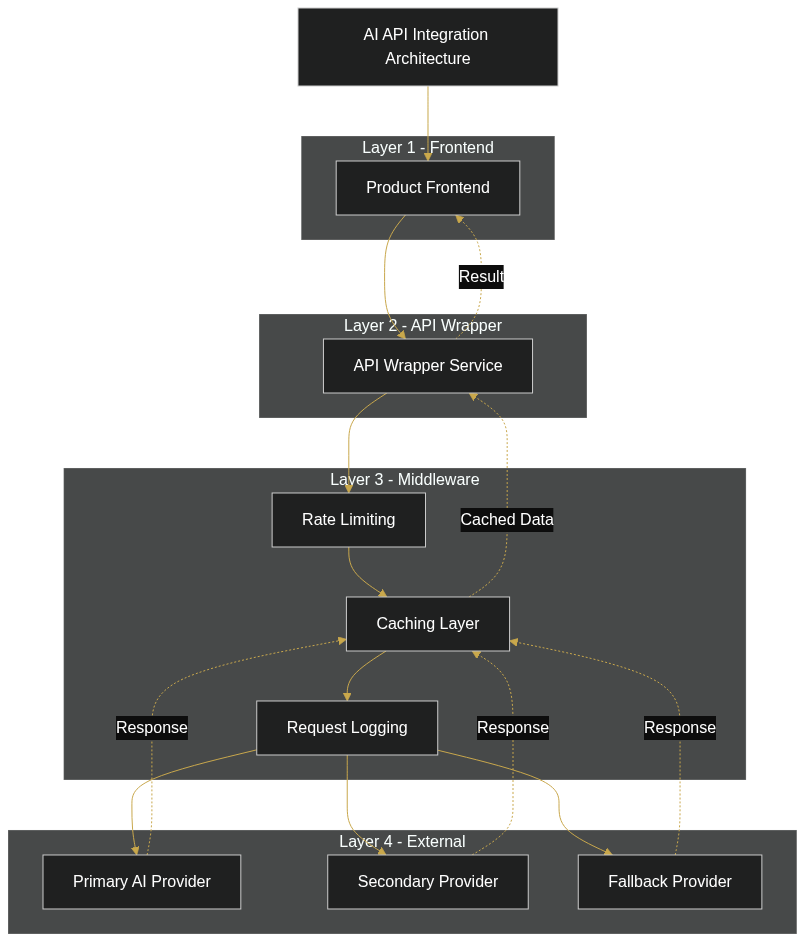
Start by building an abstraction layer. Never call an AI API directly from your product code. Instead, create an internal service (or lightweight microservice) that wraps all API calls. This adds one day of setup work but saves weeks of refactoring later.
Here’s why this matters: if you decide to switch from OpenAI to Claude, or add a fallback provider, you only modify one service. Your product code remains agnostic. On top of that, this layer is where you implement rate limiting, request deduplication, caching, and error handling, all in one place.
Your architecture should look like this: Product to API Wrapper Service to External AI API. The wrapper logs every request, tracks tokens, measures latency, and implements circuit breakers. This gives you complete visibility and control.
Layer 2: Operational Discipline
Cost control is non-negotiable. Token-based pricing means every request has a measurable cost. Implement a monitoring dashboard that tracks: tokens used per endpoint, cost per feature, cost per customer, and cumulative spend vs. budget.
Additionally, set up automated alerts. If you’ve consumed 70% of your expected monthly budget, fire an alert to your engineering lead and product manager. Give them visibility before costs spiral. Log every API request with timestamp, tokens, latency, customer ID, and feature used. This granularity lets you optimize ruthlessly.
Worth noting: implement caching for repetitive queries. If three customers ask the same question within an hour, cache the response instead of calling the API three times. Similarly, consider async processing for non-urgent tasks, queue requests, batch them, and process during off-peak hours when rates might be lower.
Expert Perspective
We’ve seen founders lose 2-3 months to integration delays because they didn’t abstract the API call early. From day one, build an internal wrapper service. It adds a day to initial setup but saves weeks later when you need to swap providers, add fallback logic, or debug cost issues.
Layer 3: Compliance and Data Handling
Data residency isn’t optional if you serve regulated customers. RBI guidelines for digital lending platforms, DRHP norms for investment platforms, and healthcare data localization rules all restrict where customer data can be sent.
Therefore, audit your AI provider’s data handling policy before production. Does OpenAI process and store your data in the US? Yes, and their enterprise privacy tier doesn’t delete it immediately. Azure OpenAI stores data in your selected region (India option exists). Claude also sends data to Anthropic’s servers in the US.
Your options: (1) Use a provider with India-resident data (Azure OpenAI India, AWS Bedrock in Mumbai region). (2) Anonymize or hash sensitive data before sending it to the API. (3) Run open-source models on your own infrastructure (Llama 2, Mistral) if vendor dependence is unacceptable. (4) Encrypt data in transit with TLS 1.3+ and require explicit customer consent in your terms.
Additionally, rotate API keys regularly. Use separate keys for development and production. Implement role-based access so junior engineers can’t access production keys. Maintain an audit log of who accessed the API and when. This isn’t paranoia, it’s baseline security.
Step-by-Step Integration Workflow
Now let’s walk through the actual implementation. This five-step workflow reduces surprises and lets you scale confidently.
Step 1: Evaluate and Select Your AI API Provider
Action: Create a comparison matrix. List your top 3 candidate providers (OpenAI, Claude, Cohere, Azure, etc.) and score them on: latency from Mumbai, cost per 1M tokens, data residency support, model variety, SLA/uptime commitment, documentation quality, and support tier.
Outcome: You’ll shortlist 2-3 finalists and request trial credits. Test latency from your actual deployment region, not just from a laptop. Measure end-to-end response time, not just API latency.
Step 2: Design Your API Abstraction Layer
Action: Build an internal service that wraps API calls. Define a simple interface: your product calls summarize_text(document) or classify_sentiment(text), and your service routes this to the appropriate external API, logs the request, and returns the result.
Outcome: Loose coupling achieved. You can swap providers without touching product code. You can add fallback logic (e.g., if OpenAI times out, retry with Claude). You have a single place to implement cost controls.
Step 3: Implement Monitoring and Cost Tracking
Action: Log every API request: timestamp, feature, tokens used, response latency, customer ID. Ship these logs to your monitoring tool (Datadog, New Relic, Splunk, or even a simple PostgreSQL table). Set up dashboards showing cost per feature, cost per customer, and cumulative daily spend.
Outcome: Real-time visibility into spend and performance. Early warning system if costs spike or latency degrades. Data to optimize which features use AI and which don’t.
Step 4: Test Fallback and Error Handling
Action: Simulate API downtime. Disable the API in your test environment, or use a chaos testing tool like Gremlin. Verify your product degrades gracefully: users see a “feature temporarily unavailable” message instead of a broken page. Test retry logic under rate limiting.
Outcome: Confidence that a single API failure won’t cascade into a full outage. You’ve built resilience into the system from day one.
Step 5: Prepare for Scale
Action: Load-test your integration with realistic traffic patterns. If your SaaS serves 1,000 customers and each makes 10 API calls per day, your API wrapper must handle 10,000 daily requests without breaking. Test latency and throughput under peak load. Consider caching strategies and async queues for non-urgent tasks.
Outcome: You can launch to production without surprises. You know exactly how much throughput your integration can handle, and you’ve identified bottlenecks before they hurt users.

Real-World Use Cases: How Indian SaaS Companies Are Using AI APIs
Finance and Fintech
Loan application analysis is a prime use case. Take a fintech startup that wants to reduce loan processing time from days to hours. They use Claude’s Vision API to extract data from uploaded PAN cards, Aadhaar docs, and bank statements. The API returns structured JSON: applicant name, income, address, employment history. A human reviews the extracted data and approves the loan 10x faster.
Compliance note: All this data is sensitive. The integration must use Azure OpenAI (India region) or encrypt data before sending it to US-based APIs. RBI guidelines mandate data residency for digital lending platforms, so this isn’t optional.
SaaS Productivity (CRM, HR, Helpdesk)
Customer support automation is another fast-growing use case. A Bangalore-based CRM startup integrates OpenAI’s GPT-4 to power a chatbot that answers customer questions using their knowledge base (FAQs, help docs, past tickets). When a customer asks “How do I reset my password?”, the chatbot retrieves relevant docs, passes them to GPT-4 with the question, and returns a conversational answer in seconds.
Cost optimization: Caching FAQ responses reduces tokens used by 60%. If the same question comes in twice, serve the cached response instead of calling the API again.
Logistics and Supply Chain
Route optimization and image recognition are valuable here. A logistics SaaS uses GPT-4 Vision to analyze warehouse photos (shelf locations, package conditions) and extract structured data automatically. For non-real-time decisions, latency doesn’t matter. For real-time decisions (e.g., autonomous routing), on-premise models like Llama are often better.
Healthcare
Medical record summarization is increasingly common. A healthtech startup uses Claude to summarize patient intake forms into concise summaries. However, they’re strict about data privacy: raw health data never leaves their servers. Only anonymized or hashed data is sent to Claude. Real sensitive fields (SSN, contact info) are redacted before API calls.
Worth noting: if they serve international patients, HIPAA compliance adds complexity. US HIPAA rules differ from India’s healthcare guidelines. This forces architecture decisions. Sometimes, on-prem processing is safer than relying on external APIs.
Common Mistakes to Avoid
Learn from others’ stumbles. These are the most common integration mistakes we see, and how to avoid them.
- Calling the API directly from the frontend. This leaks API keys to the browser, increases latency (all requests round-trip through the API), and makes rate limiting impossible. Fix: Route all calls through a backend service.
- Not tracking token usage in real time. You’ll discover you’ve burned your month’s budget in the first week. Fix: Add a logging middleware that records tokens per request, then alert at 70% of budget.
- Assuming the API is always available. It isn’t. APIs go down. Rate limits kick in. Timeouts happen. Most early integrations lack retry logic, circuit breakers, or graceful degradation. Fix: Implement exponential backoff retries, circuit breakers, and UI fallbacks.
- Ignoring data residency and compliance rules. You’ll face compliance violations during audits or due diligence. If you serve regulated customers (fintech, healthcare, BFSI), data residency is non-negotiable. Fix: Audit your API provider’s data handling before production. Use encryption and anonymization where needed.
- Vendor lock-in so deep you can’t escape. Your entire product is entangled with one API. Switching takes months. Pricing changes force you to accept cost increases. Fix: Abstract the API call behind a service layer from day one. Keep a secondary provider option ready.
Frequently Asked Questions
Which AI API should I use for my SaaS, OpenAI, Claude, or something else?
It depends on your specific use case, not a universal best choice. OpenAI GPT-4 is fastest to market and has the largest ecosystem. Claude excels at nuanced, long-form tasks and is better at reasoning. Cohere offers customization and lower costs. Azure OpenAI gives you data residency in India. Start with the provider that best fits your primary use case, then pilot it with real traffic before committing.
How much will AI API integration cost my SaaS?
Costs depend on usage patterns. If you make 100 API calls per day with an average of 500 input tokens and 300 output tokens, your monthly cost differs vastly based on the provider you choose. Rather than guessing, instrument your system to measure actual token usage, then multiply by the provider’s per-token rate. Set up monitoring to track this continuously.
Can I use open-source models like Llama instead of commercial APIs?
Yes, if you’re willing to manage the infrastructure. Llama 2 and Mistral are free to run on your own servers, but they require GPU infrastructure, fine-tuning expertise, and ongoing maintenance. For most early-stage SaaS, renting API access (OpenAI, Claude) is faster to market. As you scale, running your own models becomes cost-effective.
How do I ensure data privacy when sending customer data to AI APIs?
Use multiple strategies: (1) Encrypt data in transit with TLS 1.3+. (2) Anonymize or hash sensitive fields before sending. (3) Get explicit customer consent in your terms of service. (4) Audit your API provider’s data retention and deletion policies. (5) If data residency is critical, use providers with India-region endpoints or run models on-premise.
What happens if an AI API goes down during production?
Your product should degrade gracefully, not break. Implement retry logic (exponential backoff), circuit breakers (stop calling the API if it’s erroring consistently), and UI fallbacks (show a “feature temporarily unavailable” message). Consider maintaining a secondary API provider for fallback. This resilience is non-negotiable for production systems.
Ready to Integrate AI Into Your SaaS Responsibly
The frameworks in this guide reduce risk, control costs, and ensure compliance. If you’re building a SaaS product in India and need hands-on help navigating AI API choices, architecture, and scaling, our team has worked through every scenario outlined here. Reach out for a no-pressure conversation about your specific integration challenge.